What is broken link building? Simply put, you find pages that link to a URL that is no longer active. Then you offer a better page to replace it. Webmasters fix a broken link on their site by using your provided link or content. You get a backlink. Both sides win. It works when you match good content with the right link.
This basic tactic helps you earn links from pages that once pointed to a dead resource. Those links had value. Someone linked to that page for a reason. When the page dies, the opportunity stays. You can capture it with fresh content that does the same job.
Here’s the process:
➜ Find a broken page with links.
➜ Check if the topic fits your content plan.
➜ Create or update a page that can replace the old one.
➜ Contact the site owners. You let them know a link on their page is broken.
➜ Suggest your page as the fix. Many site owners appreciate this. It keeps their readers happy.
Why do broken links occur?
Broken links happen for several reasons. A page gets removed and shows a 404 error. A site owner retires a page and marks it as 410. A domain expires, and the whole site goes offline. The site structure changes, and old URLs stop working.
Does Broken Link Building Strategy Still Work in 2026?
Yes, but you need to follow the updated broken link building strategy.
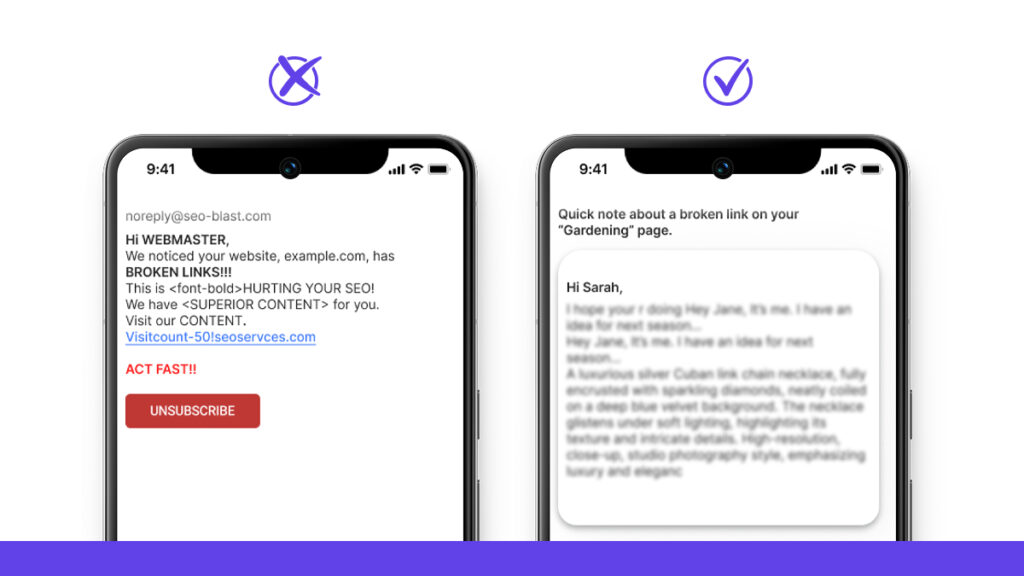
You can’t blast the same email to 500 sites anymore. People know a template when they see one. They delete it in two seconds.
What works now? Actual help and value relevant to the website. You spot a broken link in a page. You tell the site owner and show them a page from your site that fits. That’s it.
We did this for a client last month. The replies sounded similar: “Thanks for catching that.” “Didn’t know it was broken.” “I’ll fix it now.” Small wins indeed.
Site owners still fix dead links when someone points them out. You must ensure you’re convincing them properly of the advantages of fixing broken links with your URLs.
How Google Handles Broken Links
Google sees 404 pages as dead ends. Every site has them. They don’t hurt you by default. But Google stops passing value through those links. The link equity dies with the page.
That’s your chance. If you build a page that fills the gap, site owners can fix their problem. You get a link that once pointed to something people wanted.
If we look into the effectiveness of both Broken Link Building and Other Tactics, we can see the following:
| What works | What doesn’t |
|---|---|
|
|
SEO Benefits Of Authority, Relevance, And Link Equity
When you replace a dead page with something better, you take that spot. You gain authority from trusted sources. You stay on topic.
You get link equity that pushes your pages higher. You fix a problem and add value. Both sides win.
Ux Benefits for Webmasters
Clicking on a dead link sucks. It breaks trust.
When you flag the issue, you help site owners clean up their broken link building mess. They get a working link. Their readers don’t bounce. Their site looks professional again. Most website owners appreciate this. You’re saving them the work they didn’t know they needed to do.
Why Broken Link Building Is Considered A White Hat Tactic?
You’re fixing what’s broken and offering a page that covers the same topic. You’re making the site better.
Users get what they came for. The trade is fair and transparent. That’s why this method has a clean reputation. You give first. Trust follows.
How to Do Broken Link Building: Step by Step
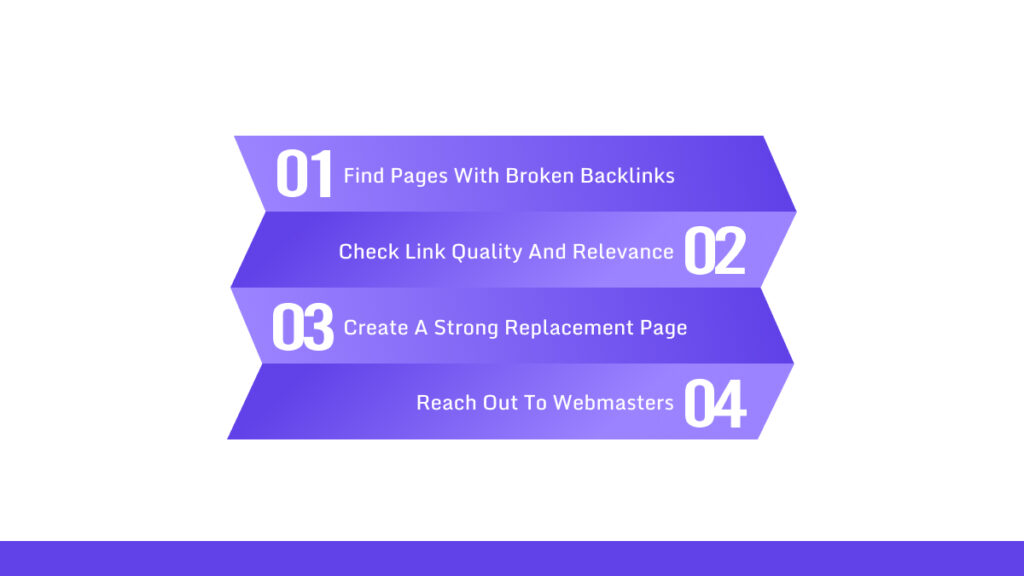
Let’s get started with the step-by-step broken link building solution. You will find the detailed steps here.
Step 1: Find Pages with Broken Backlinks
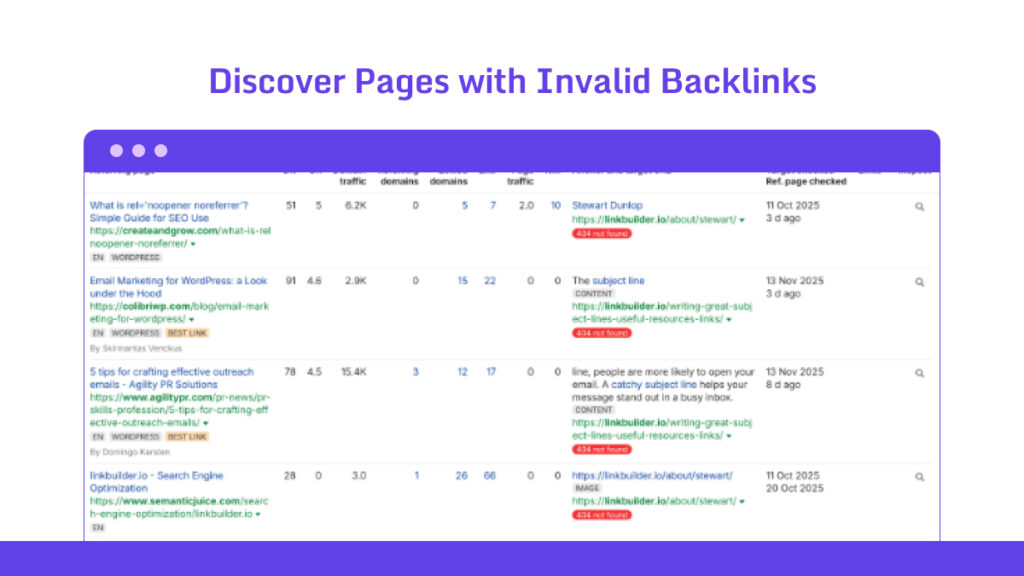
You need to identify dead links that continue to receive traffic from other sites. Then you pitch your content as the fix. Here’s how to do it.
How to Find Broken Links on Competitor Websites
- ➜ Select a competitor that ranks well in your niche.
- ➜ Open Ahrefs, SEMrush, or Majestic.
- ➜ Pull their backlink report.
- ➜ Export it to CSV.
- ➜ Sort by destination URL. Hunt for links pointing to 404 or 410 pages.
- ➜ Most tools have an HTTP status column. Use it to filter for 404s.
- ➜ Write down the dead URL, the page linking to it, the anchor text, and the domain strength.
- ➜ Toss the junk. Keep links from sites that actually match your topic and carry some weight.
- ➜ Save your list.
Find Broken Resource Pages
- ➜ Click the outbound links. Watch for 404s.
- ➜ If you have dozens of pages, use a link checker to speed things up.
- ➜ Note the broken link and grab contact info from the page.
- ➜ Focus on pages with solid backlinks or strong domains.
Find Dead Pages by Topic
- ➜ List a few keywords that fit your content.
- ➜ Use a content explorer tool. Search your keywords. Look for old pages that still have backlinks.
- ➜ Filter by page age or by backlinks with low traffic. These pages often die quietly.
- ➜ Open each one. Check if it’s gone.
- ➜ If it is, find the pages linking to it.
- ➜ Add those pages to your outreach list.
Use “Best by Links” to Uncover Broken URLs
- ➜ Open Ahrefs Site Explorer.
- ➜ Enter a domain that used to publish content in your niche.
- ➜ Go to the “Best by links” report. It shows pages ranked by incoming links.
- ➜ Export the top ones.
- ➜ Visit each page. Check if it’s dead (404 or 410).
- ➜ For dead pages, run a backlink check.
- ➜ Pick the ones with backlinks from relevant sites.
- ➜ Write a short pitch explaining why your resource works better.
Find 404 Pages Using Ahrefs, SEMrush, or Screaming Frog
| Ahrefs | SEMrush | Screaming Frog |
|---|---|---|
|
|
|
Use the Sources tab to see inbound links. Or run a backlink check in Ahrefs or Majestic.
Find Broken Links Using Free Tools and Chrome Extensions
- ➜ Install CheckMyLinks or Link Miner in Chrome.
- ➜ Open the page you want to check.
- ➜ Run the extension. It flags broken links.
- ➜ Copy the broken URL and the page it’s on.
- ➜ Use WhoIs or the site’s contact page to find an email.
- ➜ Track everything in a spreadsheet: resource page URL, broken link, anchor text, and contact email.
- ➜ Do this in batches. Don’t burn out.
A Few Small Tips That Help
- ➜ Track every email you send. Note the status and date.
- ➜ Figure out why the original link existed. It makes your pitch stronger.
- ➜ Go for relevance, not volume. One good link beats ten bad ones.
- ➜ If a broken URL now redirects somewhere, check where it goes.
You can still pitch a better resource if the new destination misses the mark.
Step 2: Check Link Quality and Relevance
This step tells you if a dead link is worth your time. Run through these checks. Treat them like a filter.
How to Evaluate Link Opportunities?
- ➜ Open the page with the dead link. Read the paragraph around it.
- ➜ Does the linking page match your content topic? If yes, keep going. If no, skip it.
- ➜ Check the site’s domain authority. Pull up your SEO tool and look at the score. Higher numbers win.
- ➜ Count how many domains link to that page. More backlinks mean the page has pull.
- ➜ Check if the page gets traffic. Real visitors mean the link actually matters.
- ➜ Read the anchor text. Does it describe your topic or just say “click here”? Specific text helps you rank.
- ➜ Find where the link lives. Is it in the article body or stuck in a footer? Body links carry weight. Footer links don’t.
- ➜ Check if the link is follow or nofollow. Nofollow links can help, but they’re second-tier.
- ➜ Scan for spam. Too many ads, thin content, or sketchy directories? Walk away.
- ➜ Give each opportunity a score from 1 to 10. Use domain strength, traffic, placement, and anchor text. That number tells you what to chase.
- ➜ Run this check on every dead link you find. High scores get your attention first.
You can check out more ways to check backlink quality here.
How to Filter Out Bad Opportunities?
- ➜ Skip pages with almost no content. If it’s just a link dump, move on.
- ➜ Ignore pages linking to fifty other resources. Your link will drown.
- ➜ Avoid obvious spam sites. Auto-generated posts, wall-to-wall ads, weird redirects—all bad signs.
- ➜ Don’t touch penalized domains. If their traffic tanked last year, they can’t help you.
- ➜ Pass on irrelevant anchor text. If your content feels forced in that spot, it won’t work.
- ➜ Skip pages where you can’t find a contact method. No email or form means a dead end.
- ➜ Ignore footer links, menu links, or site-wide widgets. Those rarely get fixed.
- ➜ Don’t bother with link farms or low-grade directories.
- ➜ If three or more red flags pop up, cross them off your list.
What Makes a Dead Link Worth Replacing?
- ➜ The page context fits your content. Your link would read naturally in that paragraph.
- ➜ The link used to drive traffic or rank. Check historical data. Past performance predicts value.
- ➜ The site has good authority and links sparingly. Your replacement will get noticed.
- ➜ The anchor text matches your content. That boosts your ranking signal.
- ➜ Your content beats the original. Give webmasters a reason to make the swap.
- ➜ You can reach the site owner. An email address or contact form opens the door.
- ➜ The site stays active. Fresh posts mean someone’s home.
- ➜ The page shows up in search results. No indexing means no SEO juice.
- ➜ If four or more of these check out, go after it.
How to Check Why the Link Was Added?
- ➜ Use Wayback Machine to view the dead page. See what the original link pointed to.
- ➜ Compare the old page with the linking context. Figure out the intent. Was it a reference? An example? A resource?
- ➜ Read the anchor text from the archive. It shows what the author valued.
- ➜ Google the dead URL’s title. You might find copies that explain its purpose.
- ➜ Look at other links on the same page. They reveal the site’s linking habits.
- ➜ Search the site for similar pages. See if they link to guides, tools, or studies.
- ➜ If the author used citations, match that format. Make your content fit their style.
- ➜ If you can’t figure out the reason, drop the priority. Some links were just filler.
Quick Scoring System
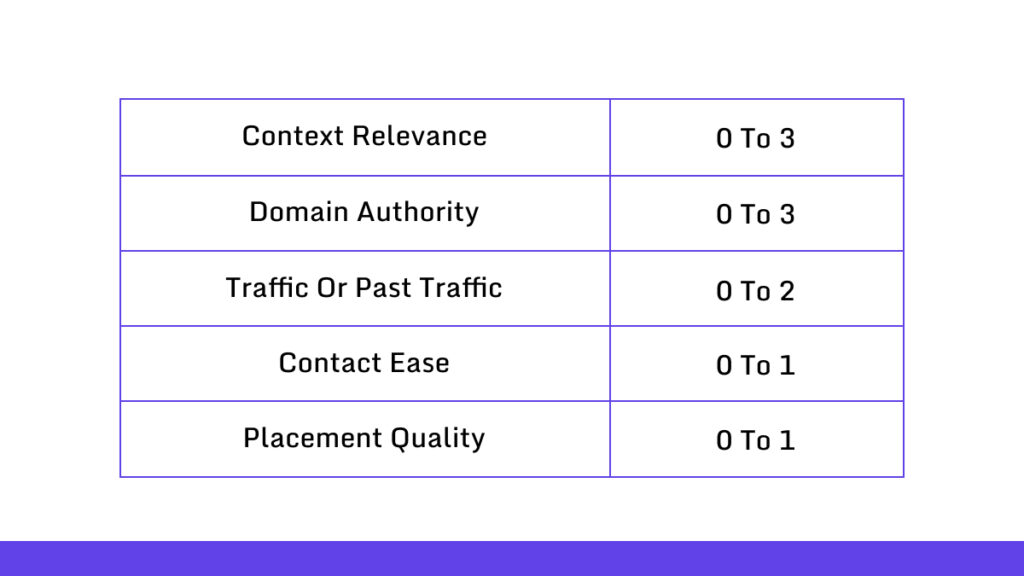
Add it up. 6 or higher? Start outreach. Lower? File it or drop it.
Step 3: Create a Strong Replacement Page
Build a page people actually want to link to. Don’t just copy what died. Make it better.
Find the Original Intent
- ➜ Pull up the dead URL in archive.org or Google cache.
- ➜ Look at the title and saved copy. What topic did it cover? What angle did it take?
- ➜ Match that intent right away. State your main idea in the first sentence. Use your target keyword once.
Use a Simple Structure
- ➜ Start with one or two sentences. No fluff.
- ➜ Break content into sections with short headings. End with a quick wrap-up and something people can link to.
Add a Linkable Asset
- ➜ Give them a list, cheat sheet, template, chart, or file they can download. Make it easy to copy or share.
- ➜ Show practical steps. Use examples. Add screenshots when they help.
- ➜ Got data? Use it.
- ➜ Run a small test. Do a quick survey. Even one solid number makes your page more link-worthy.
Make Visuals That Explain
- ➜ Add images or diagrams that readers can embed on their sites. Offer simple embed code for charts or tables.
- ➜ Link to one reputable source. It backs your claim and builds trust with the person you’ll contact.
Reverse-Engineer the Dead URL
- ➜ Check archive.org and Google cache. Take screenshots of the old content.
- ➜ Copy the outline. Note the headings, key sections, and lists. Write down any unique resources it mentioned.
- ➜ Pull the backlink data. Use Ahrefs or Majestic. Export the domains and anchor text.
- ➜ Open a few pages that linked to it. Figure out why they linked. Was it a resource roundup? A citation? An example?
- ➜ Keep what worked. Cut the rest.
- ➜ Write one sentence: “My page is better because…”
Add Linkable Points
- ➜ Pick a few assets to include. Templates work. So do lists and embed charts.
- ➜ Write clear snippets people can copy. Give each asset a short title and one-line description. Add ready-to-use HTML or text when it helps.
- ➜ Use headings that match common resource lists. Webmasters scan for phrases like “resource list” or “useful tools.” Keep those headings plain and specific.
- ➜ Share small case studies. They make editors more likely to link.
- ➜ Offer a downloadable file. PDFs and CSVs add real value.
Make Content Skimmable
- ➜ Use short paragraphs. Add bullet lists. Bold the key lines in each section.
- ➜ Create a small visual that others can embed. A PNG or SVG with embed code works well.
- ➜ Add a suggested credit line. Make it easy to copy. Less friction means more links.
Beat Your Competitors
- ➜ Open the competing pages. Check word count, headings, visuals, and claims.
- ➜ Beat them on clarity. Use shorter sentences. Write clearer steps. Drop jargon unless it serves the reader.
- ➜ Add better proof. Cite newer studies or run your own small tests. Include dates so your page looks current.
- ➜ Use more helpful visuals. Screenshots help. So do charts and quick GIFs. Caption each one.
- ➜ Speed up your page. Compress images. Use lazy-load. Keep scripts light.
- ➜ Check it on mobile. Fix any layout problems.
Optimize for Search
- ➜ Make headings match what people search for. Use a short URL with your main keyword.
- ➜ Add structured data if it fits. Schema markup for articles, how-tos, or FAQs can boost visibility.
- ➜ Link from related pages on your site. That passes authority and helps with indexing.
Step 4: Reach out to webmasters
Outreach turns your broken link list into actual backlinks.
Here’s how to do it right.
Find Contact Info (Email Finder Tools)
- ➜ Start with the target page URL.
- ➜ Look for a contact page. Use that email if you find one.
- ➜ No contact page? Try an email finder tool. Hunter, Snov, Voila Norbert, and Clearbit all work. Pick whichever you can access.
- ➜ Run a domain search. Save the emails it spits out.
- ➜ Got generic emails like info@ or webmaster@? Use them anyway. They work more often than you’d think.
- ➜ Still stuck? Check LinkedIn. Search the site name and look for marketing or content roles.
Broken Link Outreach Templates That Work
Keep messages short. Personalize one line. Don’t paste essay-length pitches. Here are four templates you can steal.
Template 1: Quick note
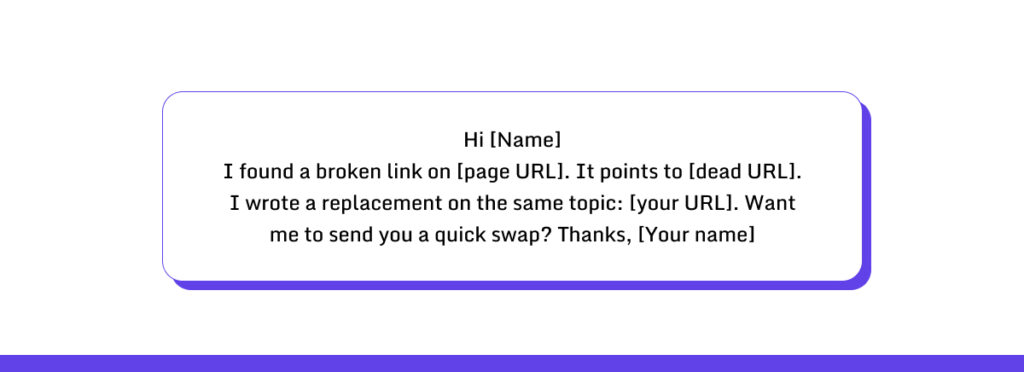
Template 2: Value first
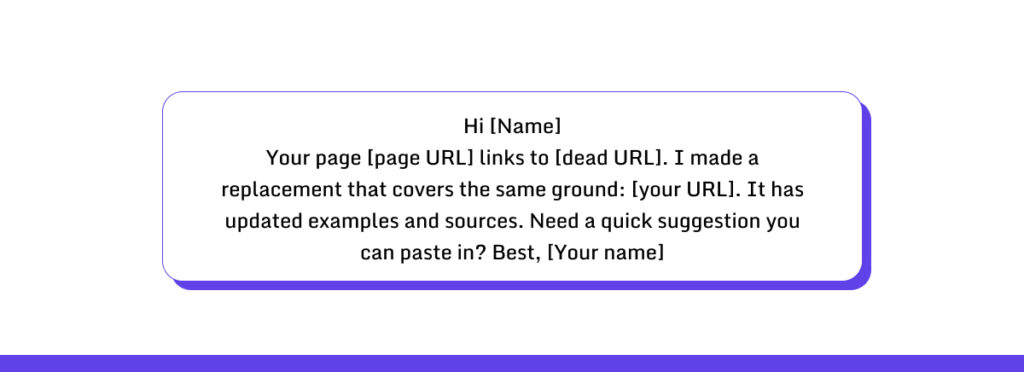
Template 3: Research angle
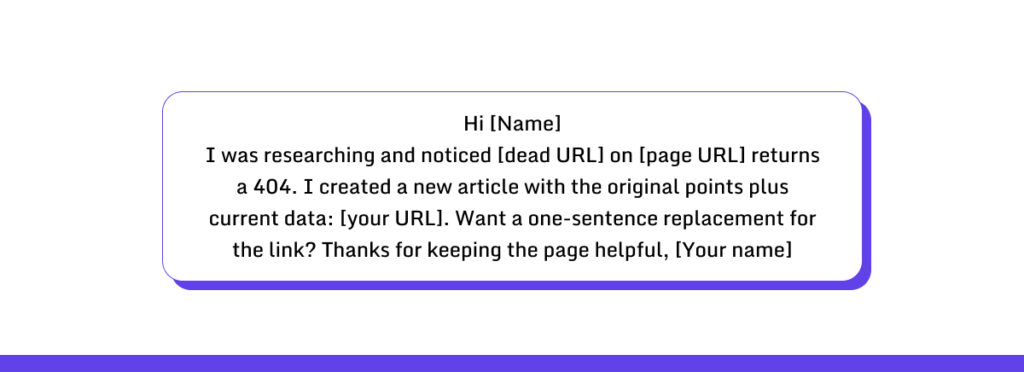
Template 4: For resource pages
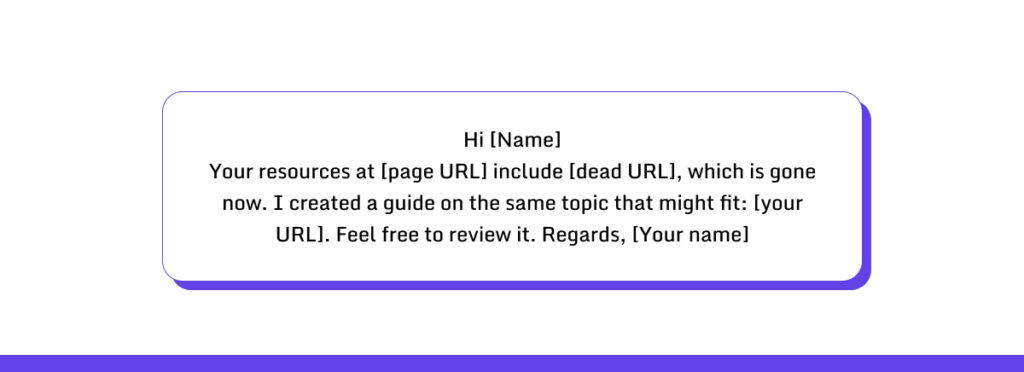
Follow-up after one week of silence
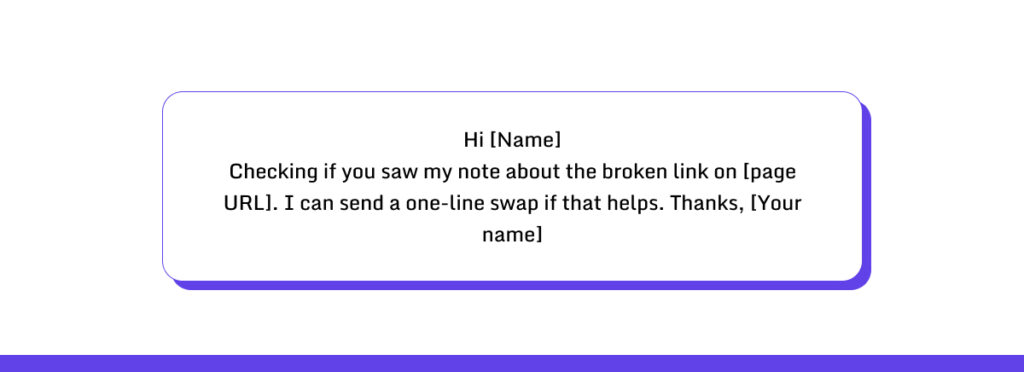
How to Pitch Different Types of Linkers?
Some webmasters link to deep, niche content. Others link broadly. Your pitch should match.
For deep linkers (they care about details):
- ➜ Keep it technical and specific.
- ➜ Point to the exact section where the link lived.
- ➜ Explain how your content matches what they originally linked to.
- ➜ Add one data point or a quick excerpt that shows value.
- ➜ Give them a sentence they can copy and paste.
For general linkers (they want quick fixes):
- ➜ Keep it short and friendly.
- ➜ Show the benefit fast. Say something like “this helps readers find current info.”
- ➜ Offer a one-line swap they can drop in right away.
- ➜ Make the change sound easy.
In practice:
- ➜ Deep linkers get a specific quote from your page.
- ➜ General linkers get a one-line replacement and a quick note on why it helps.
- ➜ Manage replies and follow-ups
- ➜ Update your spreadsheet when you send, when you hear back, and when the link goes live.
- ➜ Reply fast when they respond. Say thanks and give them the exact swap text. One sentence works.
- ➜ Do they want changes? Make them fast and send back the edited text.
Follow-up Schedule if They Don’t Reply:
- ➜ Day 3: One sentence check-in
- ➜ Day 7: One sentence check-in.
- ➜ Day 14: Polite nudge with the paste-in text again.
- ➜ Day 30: Final offer to help. Stop here if they ghost you.
When they say yes, confirm once the link is live. Ask for the final URL. They want a guest post or a link swap? Think hard before you agree. Bad guest posts aren’t worth it. Save the templates and notes that worked for each site.
Outreach Mistakes That Kill Your Success Rate
- ➜ Writing long emails. Short wins every time.
- ➜ Using boring subject lines. Put the page or topic in the subject.
- ➜ Copy-pasting the same email. Change at least one line per message.
- ➜ Hitting up irrelevant pages. If the topic doesn’t match, move on.
- ➜ Ignoring site quality. Skip spammy sites.
- ➜ Forgetting to include the dead URL. Always put it in your message.
- ➜ Not offering copy they can paste. Make their job easy.
- ➜ Following up too much. Three times max.
- ➜ Making promises you can’t keep. Stay honest.
- ➜ Not tracking results. You’ll lose conversions if you don’t record what happens.
How to Find Broken Link Building Opportunities?
We have selected 6 methods to find broken link building opportunities. Let’s discuss.
Method 1: Steal From Your Competitors’ Dead Links
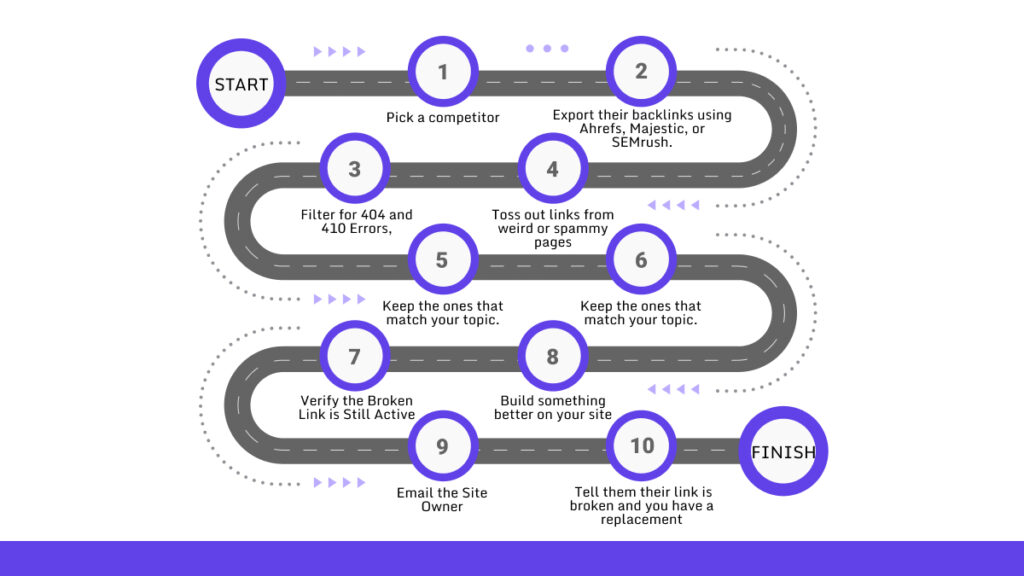
- ➜ Pick a competitor who ranks where you want to be.
- ➜ Export their backlinks using Ahrefs, Majestic, or SEMrush.
- ➜ Filter for 404 and 410 errors. Most tools let you sort by status code.
- ➜ Toss out links from weird or spammy pages. Keep the ones that match your topic.
- ➜ Open each dead link and see what it used to be. Check the page title and figure out why people linked to it.
- ➜ Find the page that’s still linking to that dead URL. Make sure the link is actually broken.
- ➜ Build something better on your site. Match what the old page did, then add more value.
- ➜ Email the site owner. Tell them their link is broken and you have a replacement. Don’t write a novel.
Method 2: Hunt Resource Pages for Dead Links
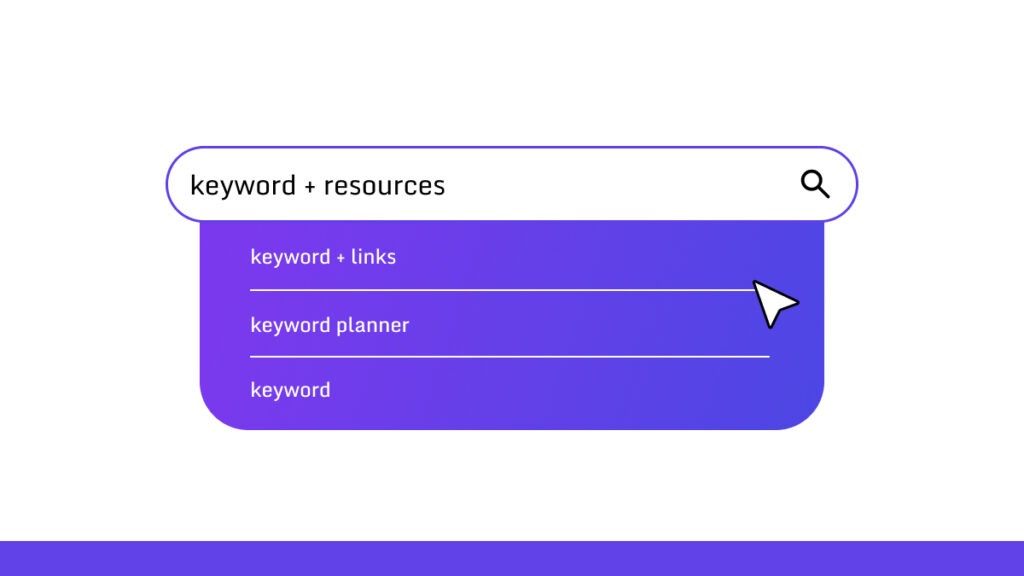
- ➜ Search for resource pages in your niche. Try searches like “keyword + resources” or “keyword + links.”
- ➜ Save the URLs you find.
- ➜ Run each page through a link checker. CheckMyLinks works if you want a Chrome extension. Screaming Frog works if you want to go deeper.
- ➜ Write down any 404 or 410 links. Grab the anchor text as well.
- ➜ Check if your content fits the gap. If it does, get ready to pitch.
- ➜ Find their contact info. Look for an email or contact form. Use Hunter or similar tools if you can’t find anything.
- ➜ Send a quick email. Point out the broken link and offer yours. One sentence should explain why your page helps.
- ➜ Wait a week. Send one follow-up if they don’t reply. Then move on.
Method 3: Fix Dead Links on Wikipedia
- ➜ Find Wikipedia pages about your topic. Look for articles with lots of citations.
- ➜ Check the references section. Look for links marked as dead or links that error out.
- ➜ Confirm the link is actually dead. Use Wikipedia’s edit history or citation tools.
- ➜ Create or find a solid source that covers the same fact. It needs to be credible and accurate.
- ➜ Make sure your source meets Wikipedia’s standards. If you’re not sure, use a third-party study or a publication with a good reputation.
- ➜ Add your source with a clean edit. Write a short explanation in the edit summary.
- ➜ Or contact the editors first. Go to the talk page and suggest your replacement. Keep it factual and short.
Method 4: Mine Expired Domains for Link Targets
- ➜ Browse expired domain lists for sites that used to cover your niche. Check domain auctions or specialty feeds.
- ➜ Pull up old snapshots with the Wayback Machine. Make sure the site had good content and links before it died.
- ➜ Export the old domain’s backlinks from Ahrefs or similar. Look for referring pages that still link to it.
- ➜ Pick the high-quality referring pages. Those are your targets.
- ➜ Build replacement content on your own site. Match what the old page offered.
- ➜ Reach out to the sites still linking to the dead domain. Show them your page and offer to fix their broken link.
- ➜ You can register the expired domain and redirect it to your content if it makes sense. But only if the linking sites allow redirects.
Method 5: Use Content Explorer to Find Forgotten Pages
- ➜ Open a content explorer tool and search for your main keywords.
- ➜ Filter for pages with lots of backlinks but low traffic now. Or pages that 404.
- ➜ Sort by referring domains. Find pages that used to attract links.
- ➜ Open each one and confirm it’s dead or outdated. Save the URL and anchor text.
- ➜ Create something better. Add fresh data, real examples, and your own take.
- ➜ Contact the sites that linked to the old page. Explain why yours is a better fit.
- ➜ Track what works and do more of that.
Method 6: Use Google Search Operators to Uncover Broken Links
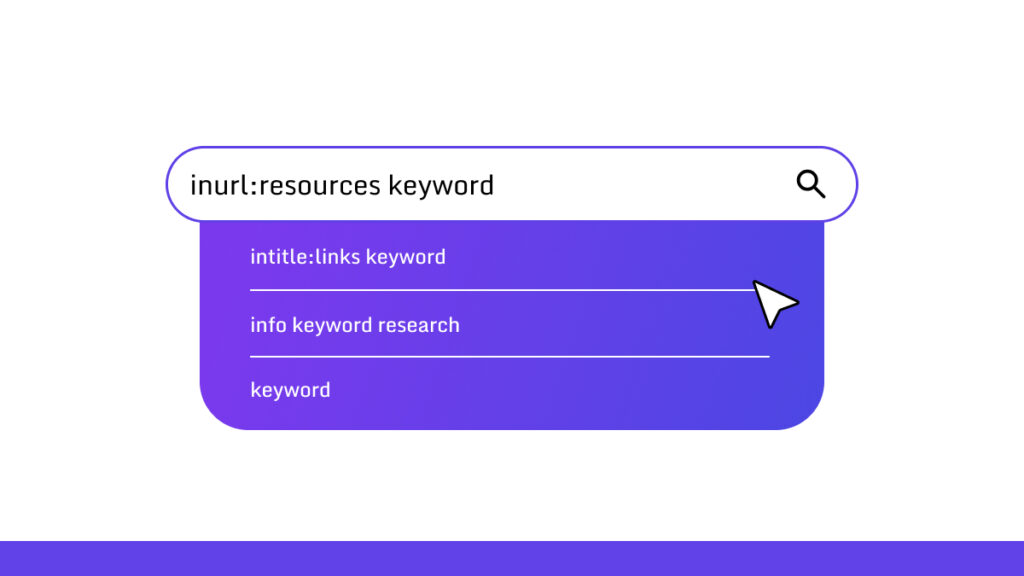
- ➜ Build Google searches that find resource pages. Try “inurl:resources keyword” or “intitle:links keyword.”
- ➜ Add filetype or site operators if you want fewer results.
- ➜ Save the pages that look like link lists or resource hubs.
- ➜ Check those pages for broken links. Use a link checker or click through manually.
- ➜ For each broken link, figure out what it was supposed to provide. Create or find matching content on your site.
- ➜ Email the site owner. Keep it short. Tell them about the broken link and offer your page.
- ➜ Write down which search patterns work best. Run those searches regularly.
Broken Link Building Tools (Paid vs Free)
Let’s look into the tools now.
Best Paid Tools for Finding Broken Links
These tools give you large backlink databases and strong reporting. They help you find broken pages fast and judge which ones are worth your time.
| Tool | Why It’s One of the Best |
|---|---|
| Ahrefs | Finds broken backlinks with strong filters. Shows link strength, anchors, and referring pages. Great for spotting high-value targets. |
| SEMrush | Strong site audit features. Helps you uncover broken links on both your site and other domains. Easy to review and sort results. |
| Majestic | Good for judging link quality with Trust Flow and Citation Flow. Helps you focus on links that pass real value. |
Best Free Tools for Scanning Broken Links
These tools work well for simple scans and quick checks. They help you spot dead links without a budget.
| Tool | Why It’s One of the Best |
|---|---|
| Check My Links (Chrome) |
Runs fast on any page. Highlights dead links in real time. Great for resource pages and manual reviews. |
| Broken Link Checker (online) |
Good for small site scans. No setup and no login. Straightforward results. |
| Wayback Machine | Helps you see what the dead page used to show. Makes it easier to plan a replacement page. |
Best Outreach Tools
These tools help you find contact details and send outreach messages. They save time and make your work more organized.
| Tool | Why It’s One of the Best |
|---|---|
| Hunter | Finds emails tied to a domain with good accuracy. Simple to use and quick to export. |
| Pitchbox | Helps you manage outreach in one place. Tracks follow-ups and replies with ease. |
| Respona | Combines prospecting and outreach in a single dashboard. Good for teams that need a smooth workflow. |
6 Broken Link Building Outreach Templates
This part gives you templates you can copy and tweak. They are short. They are easy to read. And they get replies.
Short Outreach Template
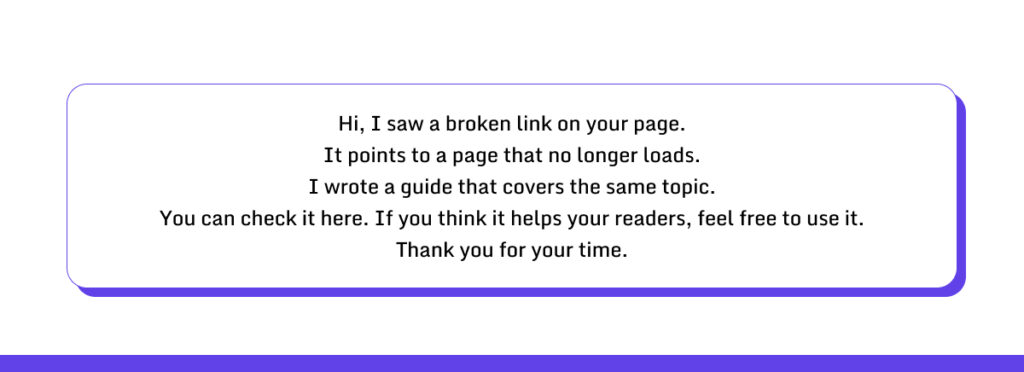
Value First Template
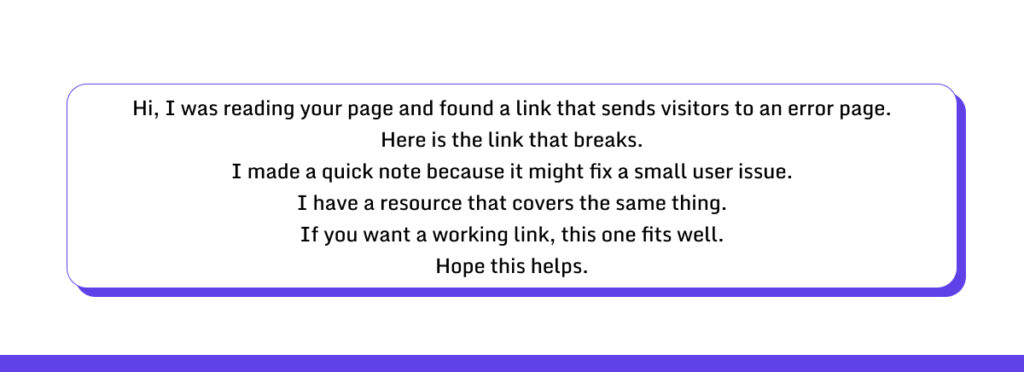
Student-based Template
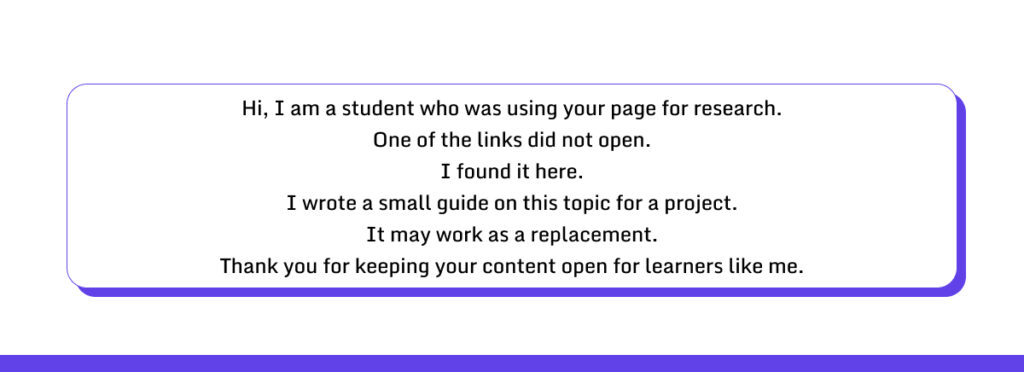
Authoritative Template
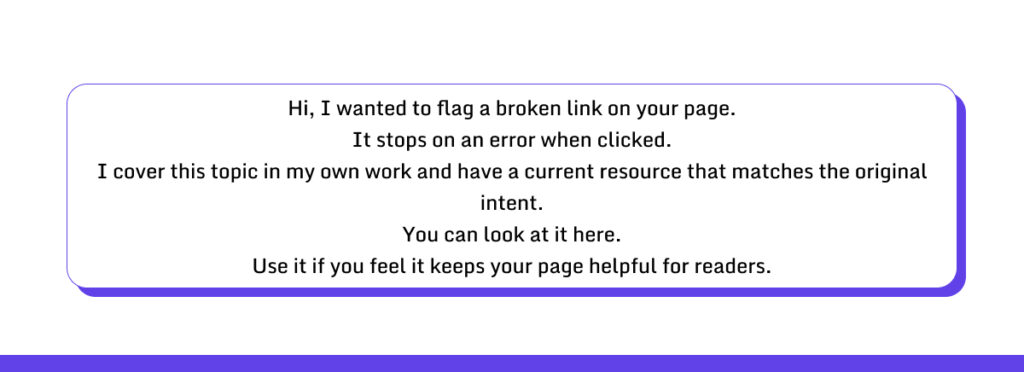
Follow-up Templates
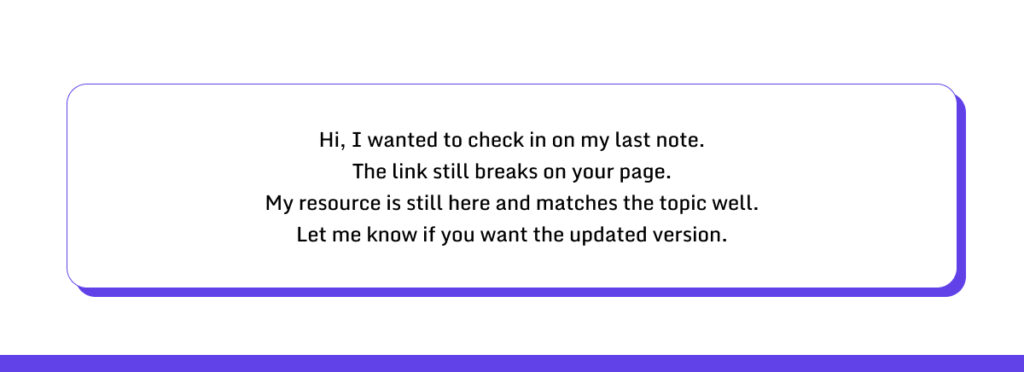
Second follow-up
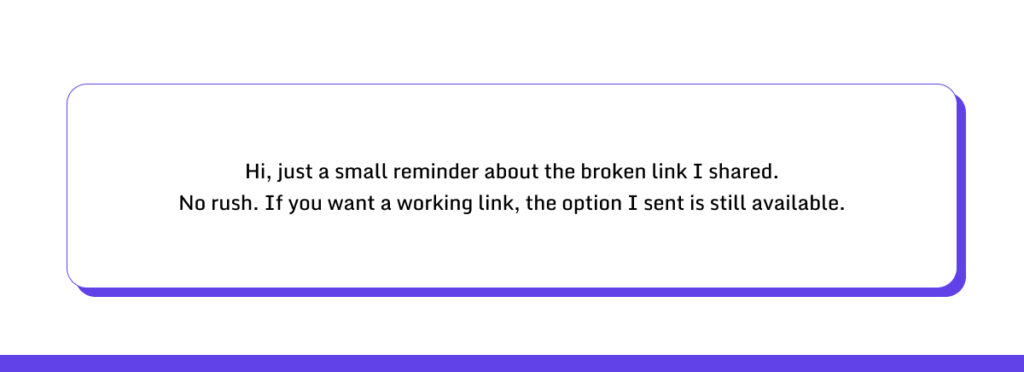
4 Advanced Broken Link Building Strategies
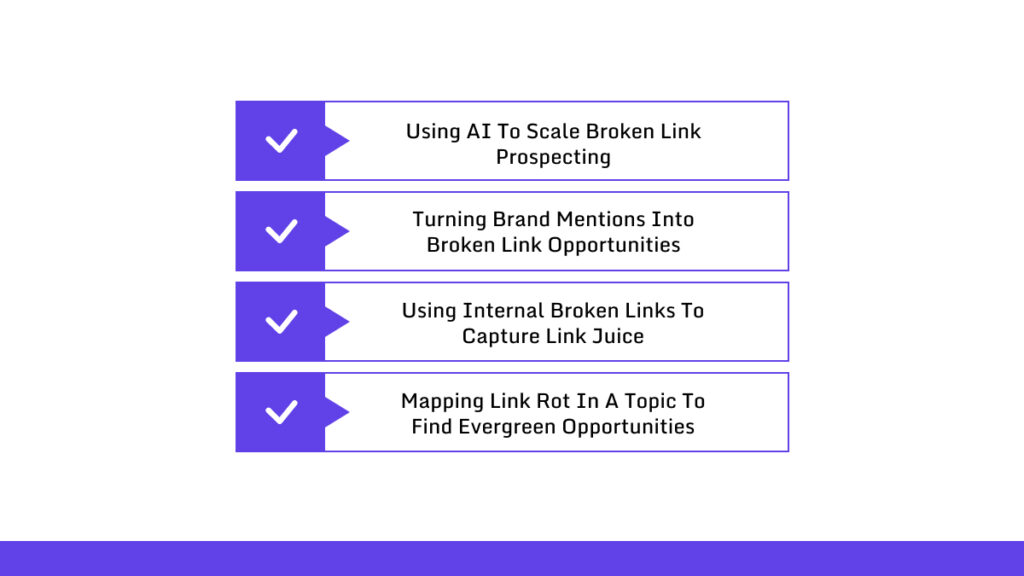
Here are 4 advanced broken link building strategies that you can utilize now!
1. Using AI to Scale Broken Link Prospecting
Finding broken links manually? That’ll eat up your entire afternoon. AI tools do the heavy lifting. They scan websites, spot 404s, and catch outdated content while you grab coffee.
You feed a tool your competitor’s sites, and it spits out hundreds of broken links and shows you who’s linking to them. Now you know exactly where to focus. Skip the grunt work and spend your energy reaching out to webmasters and writing killer replacement content.
2. Turning Brand Mentions Into Broken Link Opportunities
People talk about your brand. Sometimes they forget to link to you. Sometimes they link to a page that died three months ago. A blog mentions your guide but links to a dead page. Just email the author and give them a working URL.
3. Using Internal Broken Links to Capture Link Juice
Your own website might be bleeding link authority. Broken internal links send that SEO juice straight into a black hole.
Check your old blog posts. One links to a resource you deleted last year? Redirect it to something current and relevant.
4. Mapping Link Rot in a Topic to Find Evergreen Opportunities
Watch which pages in your niche are losing backlinks.
Let’s say a popular tutorial is hemorrhaging links because it’s outdated. Write a fresh version and reach out to sites still linking to the old one. You earn new backlinks and give readers something they can actually use.
How to Scale Broken Link Building? (For Agencies & Large Sites)
Automating Link Prospecting
Finding broken links by hand works fine for a few pages.
But it gets slow fast when you’re managing dozens of sites. Automation fixes this. Tools like Ahrefs, SEMrush, or Screaming Frog can scan multiple sites at once. They show you which links are broken and which pages still have juice.
Now you can zero in on the best opportunities without checking every single page yourself.
Automating Outreach Personalization With AI
Nobody wants to send hundreds of outreach emails one by one. AI can crank out personalized messages in a fraction of the time.
You feed it the page details and some context about the webmaster. It spits out emails that sound human and are actually relevant.
You’ll still want to review them before hitting send, but the heavy lifting is done.
Building a Topic Cluster for Replacement Pages
If you’re replacing a bunch of broken links on the same topic, get organized. Build a small cluster of pages around one subject. Each page should be solid and link naturally to the others.
When you reach out, you’ve got multiple relevant options to offer. This ups your chances that a webmaster will bite. It also builds your site’s authority on that topic over time.
Frequently Asked Questions About Broken Link Building
What is Broken Link Building in SEO?
Broken link building is a method where you find non-working links on other websites and offer your content as a replacement. The goal is to earn a backlink while helping the site owner fix a broken link. It works best when your content closely matches the original page.
How Do I Find Broken Links for Link Building?
You can check competitor websites, resource pages, and even Wikipedia for broken links. Tools like Ahrefs, SEMrush, Screaming Frog, or free browser extensions can scan pages and show which links return errors like 404 or 410.
How Many Links Can Broken Link Building Generate?
It depends on your niche, the quality of your content, and how many sites you reach out to. Some campaigns get a few high-quality links, others can earn dozens if the research and outreach are thorough.
Is Broken Link Building Safe?
Yes, it’s considered a white-hat SEO tactic. You’re helping site owners fix broken links while earning a relevant backlink. Just avoid spamming or pitching irrelevant content.
Does Broken Link Building Work for New Websites?
It can work, but new sites may struggle to get links if the content isn’t authoritative. Focus on creating strong, helpful content and target smaller or niche sites first.
How Long Does Broken Link Building Take?
It’s not instant. Finding broken links, creating replacement content, and doing outreach can take weeks. Results depend on the effort you put into research, content quality, and follow-up.
Linkscope: Your Ultimate Solution for Broken Link Building
To have the best results, mix the helpful content with guest posting, resource page outreach, and content promotion. Skyscraper content pairs nicely with broken link outreach.
Don’t forget to reclaim your own lost links or fix 404s on your site. Using several methods keeps your link profile healthy and builds your authority.
Our strategies genuinely work when you can figure out the link situations properly. Not all the broken links need equal treatment.
However, there are situations where you need expert solutions. You might need your backlinks to be delivered more quickly.